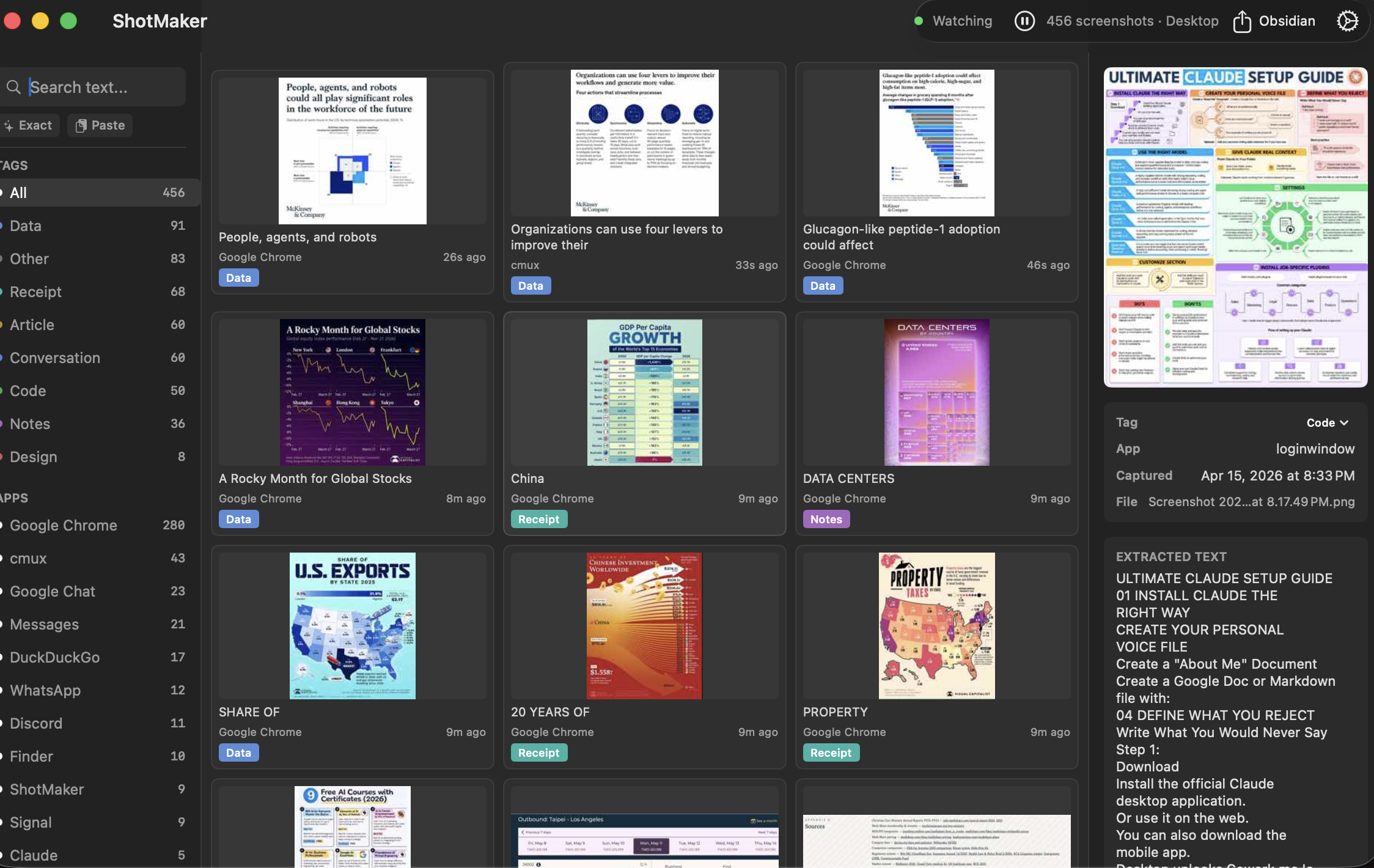
The problem
You screenshot everything.
You find nothing.
Error messages. Code snippets. That article you meant to read. A Slack message with a link. You take dozens of screenshots a week. Two weeks later you need one of them. It's gone into a folder of 3,000 files with names like Screenshot 2026-03-14 at 09.22.47.png.
The solution
Every screenshot,
instantly searchable.
ShotMaker runs quietly in your menu bar. The moment a new screenshot lands on your Desktop, it reads the text using Apple Vision OCR, tags it by type, and writes it to a local SQLite index. Full-text search. Semantic search. Filters by app. All on-device, all private.
The action
Hit ⌥⌘F.
Type what you saw.
From any app, any context. The window appears, results show up in under a second, and the matching text is highlighted in the thumbnail. No account. No cloud. No setup beyond dragging it to Applications. It either works or it doesn't — there's no configuration to get wrong.